.png)


Shining a Light on Hidden Trackers
A practical tool for personal safety: AirTag & Bluetooth tracker detection
If you’re concerned about your safety or feel like you may be being monitored, it’s important to know that technology now exists to help detect unwanted tracking devices.
One such tool is the AirGuard app, a free app designed to help identify Bluetooth tracking devices (like Apple AirTags and similar trackers) that may be moving with you without your knowledge.

What is AirGuard?
AirGuard is a mobile app developed by researchers that scans your surroundings for Bluetooth tracking devices. These include:
Apple AirTags
Other “Find My” network devices
Various third-party Bluetooth trackers
The app works in the background and alerts you if a device appears to be travelling with you over time, which may indicate unwanted tracking.
Why this matters
Bluetooth trackers are designed to help people locate lost items, but unfortunately, they can also be misused.
We are increasingly seeing situations where individuals:
Place tracking devices in cars, bags, or personal belongings
Attempt to monitor someone’s movements without their consent
For people experiencing stalking or coercive control, this type of technology can be used to extend surveillance beyond physical proximity.
How the app helps
AirGuard provides:
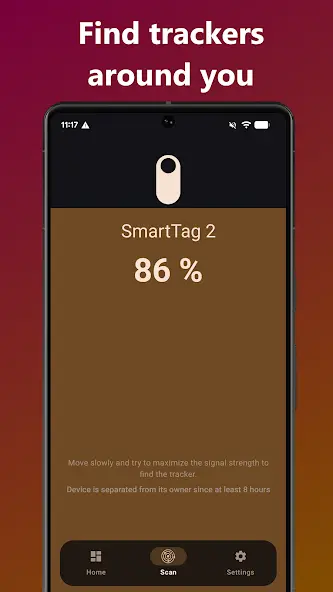
Automatic scanning for nearby tracking devices
Alerts when an unknown tracker is detected travelling with you
Signal strength indicators to help locate the device
Instructions on how to disable the tracker
Importantly, it does not require an iPhone, making it especially useful for Android users who would not otherwise receive Apple’s built-in AirTag alerts.
When should you use it?
You may consider using a tracking detection app if:
You feel like your movements are being monitored
You have concerns about stalking or harassment
You’ve noticed unusual behaviour (e.g. someone knowing your location unexpectedly)
You are going through a separation or high-conflict situation
Important limitations
While apps like AirGuard are helpful, they are not foolproof.
Not all tracking devices are detectable
Some devices may only ping intermittently
Detection can depend on Bluetooth being enabled
A lack of alerts does not guarantee that tracking is not occurring
This tool should be used as one part of a broader safety strategy, not a standalone solution.
What to do if you find a tracking device
If you locate a suspicious tracker:
Do not immediately destroy it
Take note of where it was found
Consider taking photos or documenting evidence
Contact police if you feel unsafe
Seek legal advice if appropriate
Preserving evidence can be important, particularly in legal or protection order contexts.
Seeking support
If you have concerns about tracking, stalking, or surveillance, it’s important to seek support through established services that are equipped to assist directly.
You can contact:
1800RESPECT – 24/7 confidential counselling and support (1800 737 732)
DVConnect – specialist crisis support in Queensland (1800 811 811)
Queensland Police Service – if you are in immediate danger, call 000
There are also local support services available that can assist with safety planning, emergency accommodation, and ongoing support.
The Lighthouse Hub works alongside established organisations and community partners by supporting access to safety technology and raising awareness of risks like technology-facilitated surveillance.
If you’re unsure where to start, reaching out to one of the services above is a strong first step.


